CaterBoost by Omni Scale

Know every client.
Time every follow-up.

CaterBoost turns your catering order history into a clear view of every client: when they're likely to order again, which packages fit their next event, and which new businesses nearby are worth a call. Your team decides; CaterBoost does the legwork.

  • Built for catering workflows
  • Imports from CSV or Excel
  • Nothing sent without approval
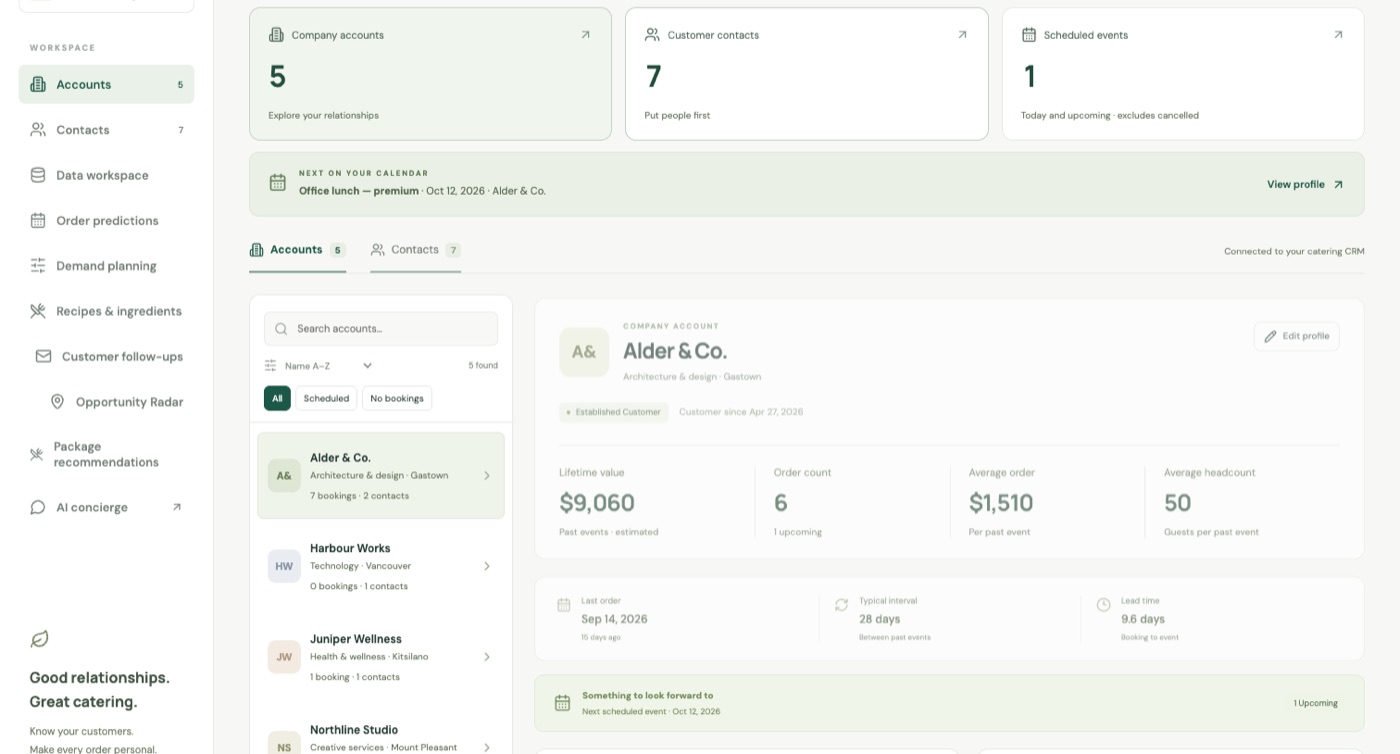
CaterBoost dashboard: company accounts, contacts, the next scheduled event, and a client profile with lifetime value, order count, average order, and headcount.

Why caterers use CaterBoost

Built for catering

Packages, headcounts, occasions, dietary notes, and delivery addresses are first-class, not custom fields.

Grounded in your orders

Every metric is calculated from recorded orders. No guessed numbers, and unknowns stay unknown.

People stay in control

CaterBoost suggests and drafts. Your team reviews, approves, and sends.

Private by design

Predictions and recommendations are computed on your own data, with no outside AI calls.

What CaterBoost does

From inquiry to reorder, every client covered.

Three tools do the heavy lifting: predictions tell you who's due, recommendations tell you what to offer, and Opportunity Radar shows you who to approach next.

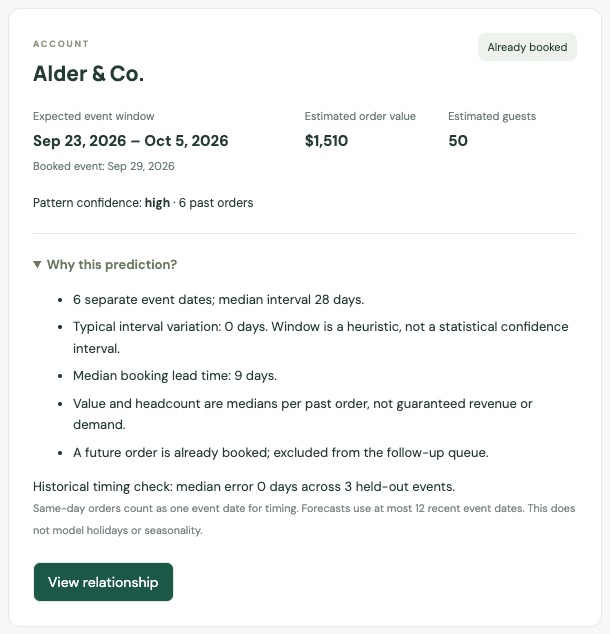
An order prediction for a client: expected event window, estimated order value and guests, pattern confidence, and the reasons behind the prediction.

Order predictions

Know when each client is due to order again.

Many catering clients order on a rhythm. CaterBoost reads each account's past event dates and estimates the next event window, so you can reach out before a competitor does.

  • Expected event window, typical order value, and headcount
  • A suggested follow-up date based on how far ahead the client usually books
  • “Why this prediction?” shows the history behind every estimate
  • Clients with an upcoming booking are left out of the follow-up queue

Confidence reflects how regular and complete a client's history is. Predictions guide your team; they aren't a guarantee of another order.
Package recommendations

The right package for every inquiry.

Enter the guest count, budget per person, occasion, preferences, and dietary needs. CaterBoost shortlists the packages that genuinely fit and explains each pick, so your team quotes faster and more consistently.

  • Filters by menu minimums, budget, and every dietary requirement
  • Ranks the remaining packages by fit with the occasion and preferences
  • Shows up to three picks with the reasoning for each
  • Never quietly relaxes a requirement to fill the list

Works from day one using your menu, with no order history needed. Allergen safety is always confirmed by your kitchen.

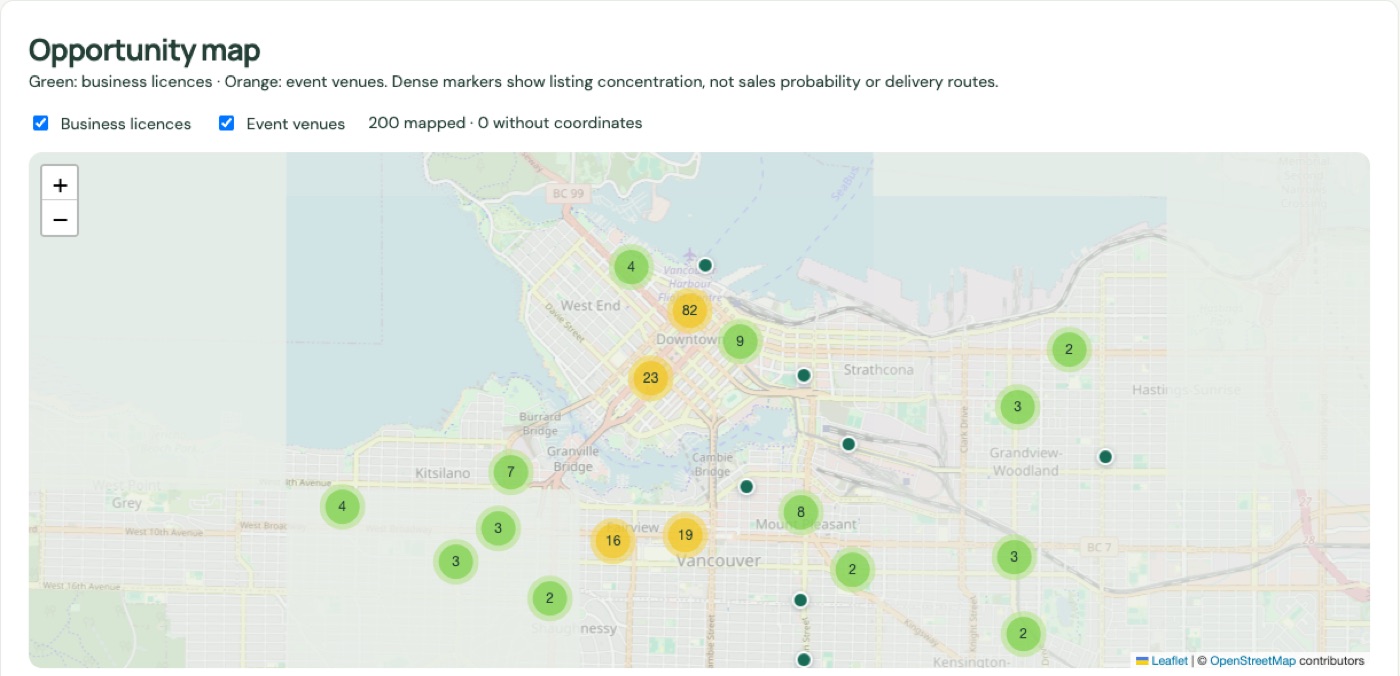
Opportunity Radar map of Vancouver with clustered markers for newly licensed businesses and upcoming event venues.

Opportunity Radar

Find your next corporate client.

New offices and upcoming events are natural catering opportunities. Opportunity Radar maps them around the area you choose, so your team always has a fresh list of businesses to research.

  • Newly licensed businesses from City of Vancouver open data
  • Upcoming ticketed events for the next 30 days
  • Live office search with Google Places
  • An interactive map with clusters, filters, and a weekly refresh of saved leads

Currently built around Vancouver data sources. Listings are leads to research, not proof of catering demand.

Customer follow-ups

Follow-ups drafted. You hit send.

Predictions only become revenue when someone acts on them. CaterBoost lists the clients who are overdue or due soon and prepares a personalized reminder for each one.

  • A queue of due-soon and overdue repeat clients
  • Addressed to the client's most recent ordering contact
  • One draft per client per order cycle, so no double reminders
  • Saved straight into Gmail as drafts for your team to review

CaterBoost never sends email on its own. Your team checks each draft, permissions, and opt-outs before anything goes out.

A client profile showing lifetime value, order count, average order value, average headcount, last order, typical interval, and lead time.

Customer 360 profiles

Every client on one page.

Lifetime value, order count, average order and headcount, typical ordering interval, booking lead time, favourite packages, dietary notes, and the people behind every order, for each company and contact.

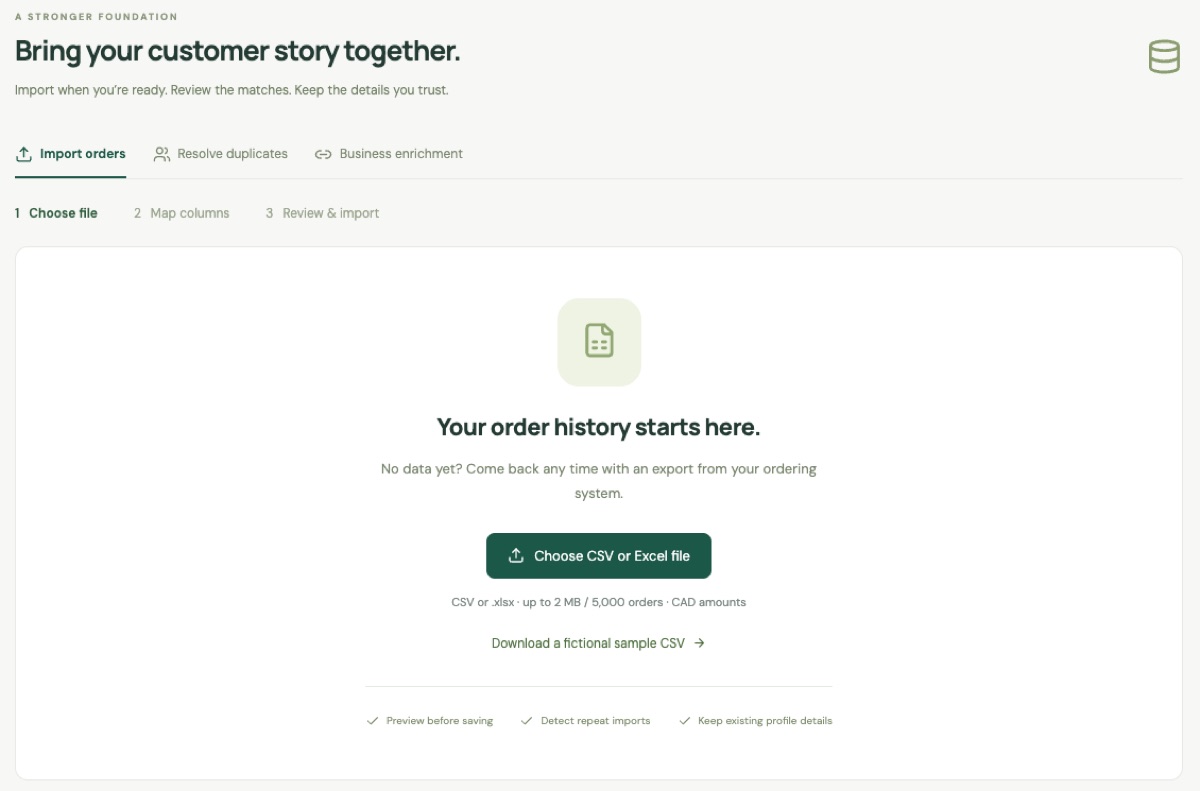
The data workspace with tabs for importing orders, resolving duplicates, and business enrichment.

Data import & enrichment

Bring your order history with you.

Import CSV or Excel exports from your ordering platform, map the columns, and preview before saving. Resolve duplicate contacts and accounts, and enrich company profiles through Data Axle, Google Places, or Apollo when connected.

Also included

Plan the kitchen. Answer every inquiry.

The same client data powers weekly planning and a booking concierge that's grounded in your real menu.

Weekly demand planning

Orders and guests by package for the next eight weeks, with promotion and seasonal adjustments, exception flags, and a shared proposal and approval queue.

Recipes & ingredients

Add per-guest recipes for each package and turn weekly guest plans into gross ingredient requirements you can review and save.

AI booking concierge

A chat assistant powered by Claude that answers menu questions, prices events from your menu, and takes booking requests with a reference and estimated total.

How it works

Your orders in, clear next steps out.

CaterBoost works with the order history you already have. We set it up with you and train your team.

  1. 1Import

    Bring in your orders

    Export orders from your ordering platform or spreadsheets, import them, and merge duplicate contacts and accounts.

  2. 2Understand

    Profile every client

    CaterBoost calculates value, ordering rhythm, favourite packages, and lead time for every company and contact.

  3. 3Act

    See what to do next

    Who's due to reorder, what to offer each inquiry, which new businesses to approach, and what to plan for next week.

  4. 4Approve

    Your team decides

    Review drafts, plans, and outreach before anything happens. Nothing is sent or ordered automatically.

Privacy by design

Your data stays yours.

Client profiles, predictions, recommendations, demand plans, recipes, and follow-up lists are calculated from your own database, with no outside AI calls and no API keys required.

Only four optional features reach outside services, and only when you connect them.

  • AI booking concierge

    Anthropic's Claude, to answer client chats

  • Business enrichment

    Data Axle, Google Places, or Apollo, for company details

  • Opportunity Radar

    City of Vancouver Open Data, Ticketmaster, and Google Places

  • Gmail drafts

    Your Gmail account, with your permission

FAQ

CaterBoost, explained.

Have another question? Email info@omniscale.ca or call +1 (236) 888-7878.

Do we have to replace our ordering platform?

No. CaterBoost works alongside it. Most ordering platforms can export orders to CSV or Excel, which is all CaterBoost needs to build your client profiles.

How much order history do predictions need?

A client needs at least three past events for a prediction. The more regular and complete the history, the higher the confidence CaterBoost shows. Package recommendations and the booking concierge work from your menu, with no history needed.

Does CaterBoost email clients automatically?

No. It prepares follow-up drafts in Gmail, and your team reviews and sends them. Nothing goes to a client without a person approving it.

Where does Opportunity Radar work?

It's currently built around Vancouver sources: City of Vancouver business licences and upcoming ticketed events in the city, plus live Google Places searches around the area you choose.

Is it only for large caterers?

No. It's designed for catering teams of any size that serve repeat business and corporate clients, and want to spend less time on admin and more time on food and service.

How do we get started?

Book a demo. We'll walk through CaterBoost with your team, help you import your order history, and set up the features you need first.

CaterBoost demo

See CaterBoost with your own orders.

Book a demo and we'll show you who's due to reorder, what to offer, and where your next clients are, using your own order history.

  1. 1
    Tell us about your catering business

    Takes about two minutes.

  2. 2
    We reply within one business day

    To book a time that works for your team.

  3. 3
    See it live

    A walkthrough of the features that matter most to you.

Prefer to reach us directly?

Book a CaterBoost demo

We'll reply within one business day.

Which features interest you?

We'll only use your details to respond to your request.